Confidence scores
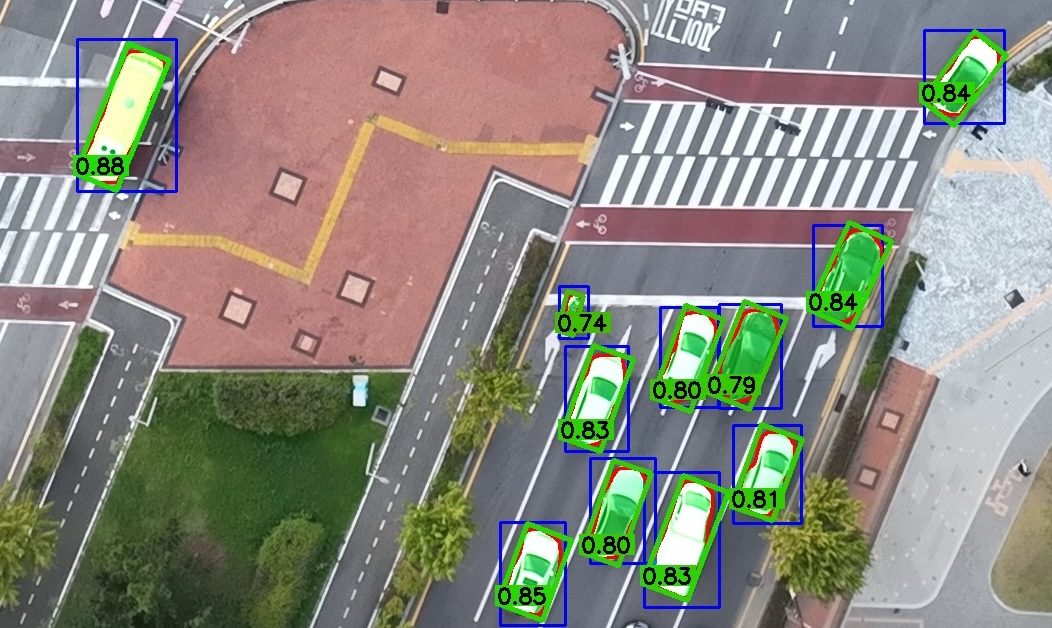
Each OBB can carry a score in [0, 1] for triaging a converted dataset: high scores are tight SAM fits, low scores are worth a look, and 0.0 marks a fallback where the HBB was kept. The score is a heuristic for ranking boxes, not a calibrated probability.
How it is computed
The conversion score is the product of two factors:
- Rectangularity: the area of the contour the box was fitted to, divided by the area of the box.
1.0for a perfectly rectangular object; lower when the mask is ragged or the box encloses much empty space. - Ensemble consensus: the area of the voted mask divided by the area of the union of the models' masks.
1.0for a single model; for two models it equals their mask IoU.
Where fragments were fitted together, rectangularity uses the pieces' own area, so the gap between them lowers the score.
Writing it
| Flag | Where the score goes |
|---|---|
--save_confidence |
a 10th column on each OBB line, and a trailing column on each polygon line |
--confidence_dir DIR / -cd DIR |
DIR/<image stem>.txt, one score per line, row-aligned with the labels |
--confidence_dir with no value |
the same, in <img_source>/../labels_confidence |
Use --confidence_dir when the label files have to stay standard: Ultralytics and other YOLO OBB readers reject a 10th column. The two flags can be combined.
hbb2obb-view and hbb2obb-convert read the scores from either place. In --save_img overlays the OBBs are always tinted green to red by score, and --show_confidence also prints the value.
Choosing which score is reported
When the HBB files carry a detector confidence in a 6th column, --confidence_source / -cs chooses what the reported score means:
| Value | Reported score |
|---|---|
conversion (default) |
the conversion score above |
detector |
the detector confidence read from the HBB input |
combined |
the product of the two |
The conversion score says how well the box fits the segmented shape; the detector score how sure the detector was that there is an object at all. A box whose input line has no 6th column reports its conversion score, with a warning.
hbb2obb-detect writes that 6th column for the boxes it finds and, with --merge_with, for boxes drawn by hand. The sample data ships detector output, and its labels_obb/ is scored combined.
Using it
- Review the lowest scores first.
hbb2obb-view images --show_confidencecolors every OBB by score;ctoggles the coloring in the window. - Flag boxes for a release.
hbb2obb-convert ... --to dota --difficult_from confidence --difficult_below 0.5sets the DOTAdifficultflag on every box below the threshold. See The difficult flag. - Find fallbacks. Every run reports how many there were; a
0.0score in the files marks which, unless--confidence_sourceisdetector.
In Python
hbb2obb(..., return_confidence=True) returns the scores beside the OBBs, and confidence_source selects them as the flag does. See hbb2obb().