Tune hyperparameters
hbb2obb-optimize searches the conversion settings against ground-truth OBBs. Each combination of settings, a grid point, converts the whole image set and is scored as hbb2obb-eval would score it; grid points are ranked by mean IoU.
It reads the HBBs from <img_source>/../labels_hbb or --hbb_dir / -hd, and writes into <output_folder>/<run_name>: by default <img_source>/../benchmark_results/, then the models joined by -. Use a ground-truth set that is not the data you will report results on.
The grid
A sweep holds the models fixed and takes the full product of three axes:
| Axis | Flag | Default |
|---|---|---|
| SAM inference resolution | --imgsz / -iz |
640 960 1280 |
| prompt scale factor | --scale_factors / -sf |
-0.01 to 0.1 in steps of 0.01 |
| morphological kernel | --opening_kernels / -ok |
0.15 |
The defaults make 3 × 12 × 1 = 36 grid points, each a full conversion of the image set; three kernels instead of one make 108. Negative kernels close instead of open, so one axis covers both:
# 2 x 3 x 5 = 30 grid points
hbb2obb-optimize images gt -sm sam_l -iz 960 1280 -sf 0.02 0.04 0.06 -ok -0.2 -0.1 0 0.1 0.2
--fragment_ratio / -fr (default 0.1) is fixed for the whole sweep. --dry_run prints the grid and its size without converting anything.
Each checkpoint is loaded once per sweep, and its load time is recorded apart from the conversion's. --device, --model_kwargs and --models_dir work as in hbb2obb.
The scoring takes the evaluation flags of hbb2obb-eval: --iou_threshold, --class_agnostic, --excluded_classes, and --exclude_edge_cases with --img_width, --img_height and --edge_tolerance.
What a sweep writes
benchmark_results/
├── sam_l-sam_b/
│   ├── run_config.yaml   # the resolved settings and the host it ran on
│   ├── results.yaml      # every grid point and every metric recorded at it
│   ├── summary.txt       # the best grid point, then every grid point ranked
│   └── plot.png          # IoU against scale factor
├── summary.md            # the best grid point of every run, in one table
├── summary.tex           # the same runs as a LaTeX table
├── comparison.png        # best IoU against execution time, one point per run
├── comparison.pdf        # the comparison drawn for a manuscript
└── PROVENANCE.txt        # the command, versions, source digest, checkpoint and label hashes
summary.txt starts with the winner:
BEST PARAMETERS:
  Image Size: 1280
  Scale Factor: 0.0500
  Opening Kernel: 0.1500
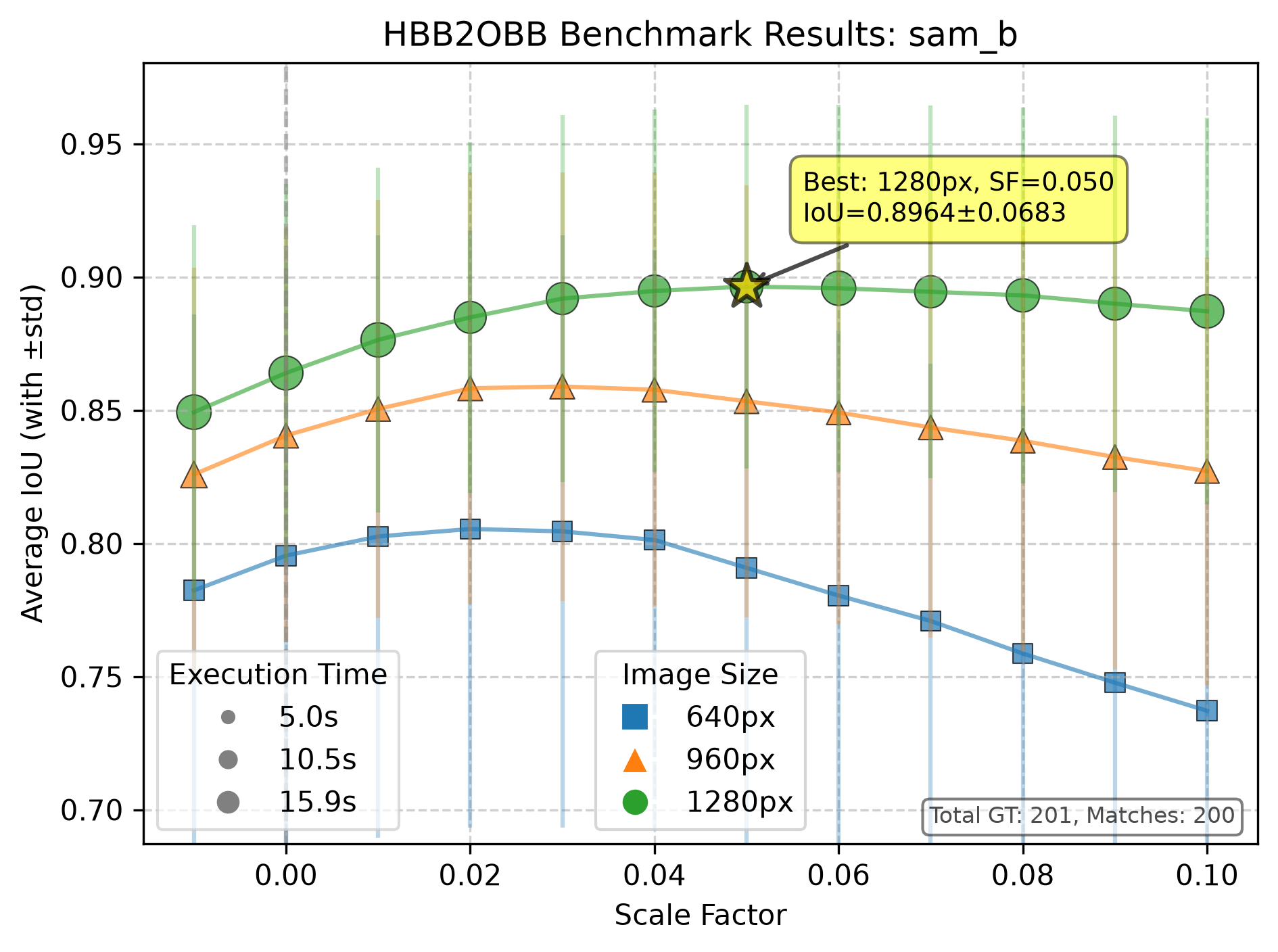
  Average IoU: 0.8964 ± 0.0683
  Total Matches: 200
  Total GT: 201
  Total Pred: 201
  Execution Time: 14.08 seconds
plot.png draws mean IoU against scale factor, one line per image size, with marker area showing execution time. Over several kernels, each kernel gets its own shade and marker within its image size's color:
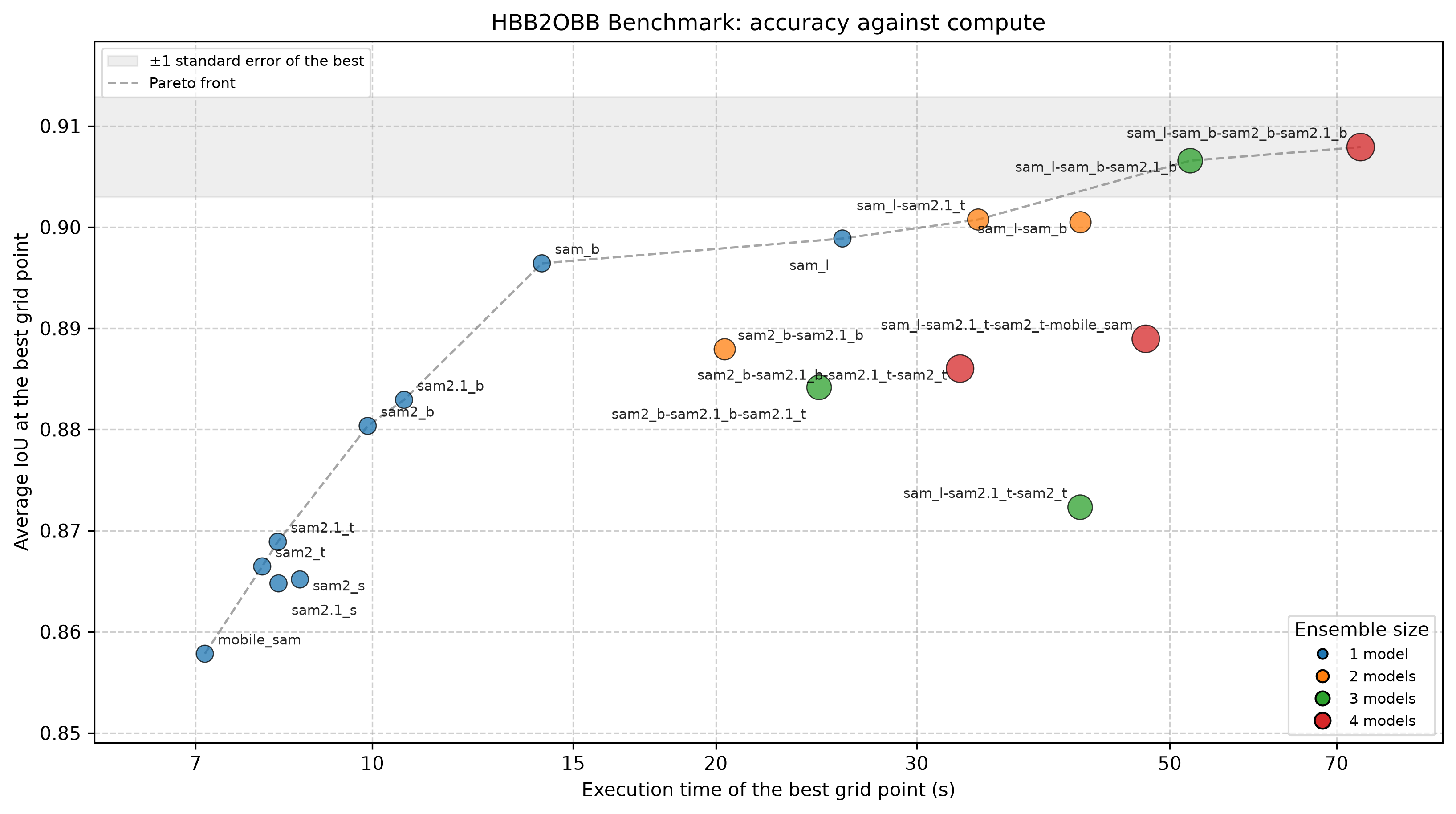
summary.md, summary.tex, comparison.png and PROVENANCE.txt cover every run in the output folder, including runs from earlier invocations. comparison.png plots each run's best grid point against its execution time, with the Pareto front dashed.:
Reading the result
Read the ranking against sem_iou, the standard error of the mean IoU, recorded at every grid point. The ± beside a mean IoU in the summaries is the box-to-box spread, a different quantity. comparison.png shades ±1 sem_iou around the leading run, and runs inside that band are tied: prefer the cheaper one.
Then convert with the winning settings:
hbb2obb images --sam_models sam_l sam_b --imgsz 1280 --scale_factors 0.05 --opening_kernel_percentage 0.15
In a manuscript
summary.tex is the table for a manuscript: one row per run at its grid point of highest mean IoU, with that point's image size, scale factor and kernel, the mean IoU ± sem_iou, the share of boxes at IoU ≥ 0.90, the 90th percentile orientation error and the time of one pass. The runs within one sem_iou of the leader are in bold. It holds only the tabular (it needs booktabs), so the caption and label stay in your document:
Its comment header gives the run, grid point and ground-truth box counts. The sample benchmark ships one: data/benchmark_results/summary.tex. A --refresh of an unchanged folder rewrites summary.tex and comparison.pdf byte for byte.
comparison.pdf is the figure to go with it, drawn at a 6.4 in text width to be included at 100%: mean IoU with the ±1 sem_iou band beside the share of boxes at IoU ≥ 0.90 in percent, each run at its own best grid point for the score shown, against the time of one pass. It has no title, every label sits beside its point or is tied to it by a line, runs are named by short model names (L for sam_l, 2.1B for sam2.1_b) with the key printed beneath, and its fonts are embedded TrueType. A folder measured before the IoU ladder existed gets the mean IoU panel alone, at half the width. --no_plot skips it.
Plotting another metric
Every grid point records more than mean IoU, and --plot_metric / -pm chooses which one the figures draw: avg_iou (default), median_iou, iou_at_75, iou_at_90, median_angle_error or p90_angle_error; see Metrics.
Every sweep also draws p90_angle_error and iou_at_90, so each run folder holds plot.png, plot_p90_angle_error.png and plot_iou_at_90.png, and the output folder a comparison_<metric>.png and summary_<metric>.md for each. A run plot stars the grid point that metric prefers, and the Pareto front follows the metric's direction. The search itself always ranks by mean IoU.
Benchmarks: several sweeps from one file
A YAML file lists the runs, and one command produces all of them:
# benchmark.yaml
img_source: data/images
gt_dir: data/labels_obb_gt
output_folder: data/benchmark_results

defaults:
  imgsz: [640, 960, 1280]
  scale_factors: [0.03, 0.04, 0.05, 0.06, 0.07]

runs:
  - sam_models: [sam_b]
  - sam_models: [sam_l]
  - sam_models: [sam_l, sam_b, sam2_b, sam2.1_b]
    name: strong-four
hbb2obb-optimize -c benchmark.yaml --dry_run       # the runs, the grid sizes, the total cost
hbb2obb-optimize -c benchmark.yaml                 # all runs
hbb2obb-optimize -c benchmark.yaml --only sam_l    # some of them, by name
hbb2obb-optimize -c benchmark.yaml --resume        # skip the runs already complete
hbb2obb-optimize -c benchmark.yaml --refresh       # redraw the plots, summaries and table only
Each run takes the defaults and overrides what it names. A run with no name is named after its models, so [sam_l, sam_b] writes into sam_l-sam_b. Paths resolve against the current working directory. The output folder gets a copy of the config, so the results can be re-run from wherever they end up.
| Level | Keys |
|---|---|
| top | img_source, gt_dir (required); runs (required, a list); hbb_dir, output_folder, defaults |
defaults and each run |
sam_models (required in one of the two), imgsz, scale_factors, opening_kernels, fragment_ratio, iou_threshold, class_agnostic, excluded_classes, exclude_edge_cases, edge_tolerance, img_width, img_height, model_kwargs, device |
| each run only | name |
An unknown key stops the benchmark before it starts. On the command line, --device overrides every run's device.
--resumeskips a run whoseresults.yamlalready holds every grid point the config asks for, at the samefragment_ratio; a run with a changed grid is measured again.PROVENANCE.txtthen names the runs this invocation measured and the ones it kept.--refreshredraws the plots, the summaries andsummary.texfrom each run'sresults.yamland nothing else, so it works on a results folder copied away from its images, labels and checkpoints, and it leavesPROVENANCE.txtas it was. With--plot_metricit draws another metric without a single SAM pass:
data/benchmark.yaml is a working example, the file behind data/benchmark_results/. The Songdo Vision OBB study ran the same way over 495 grid points.
All flags: hbb2obb-optimize reference.