View annotations
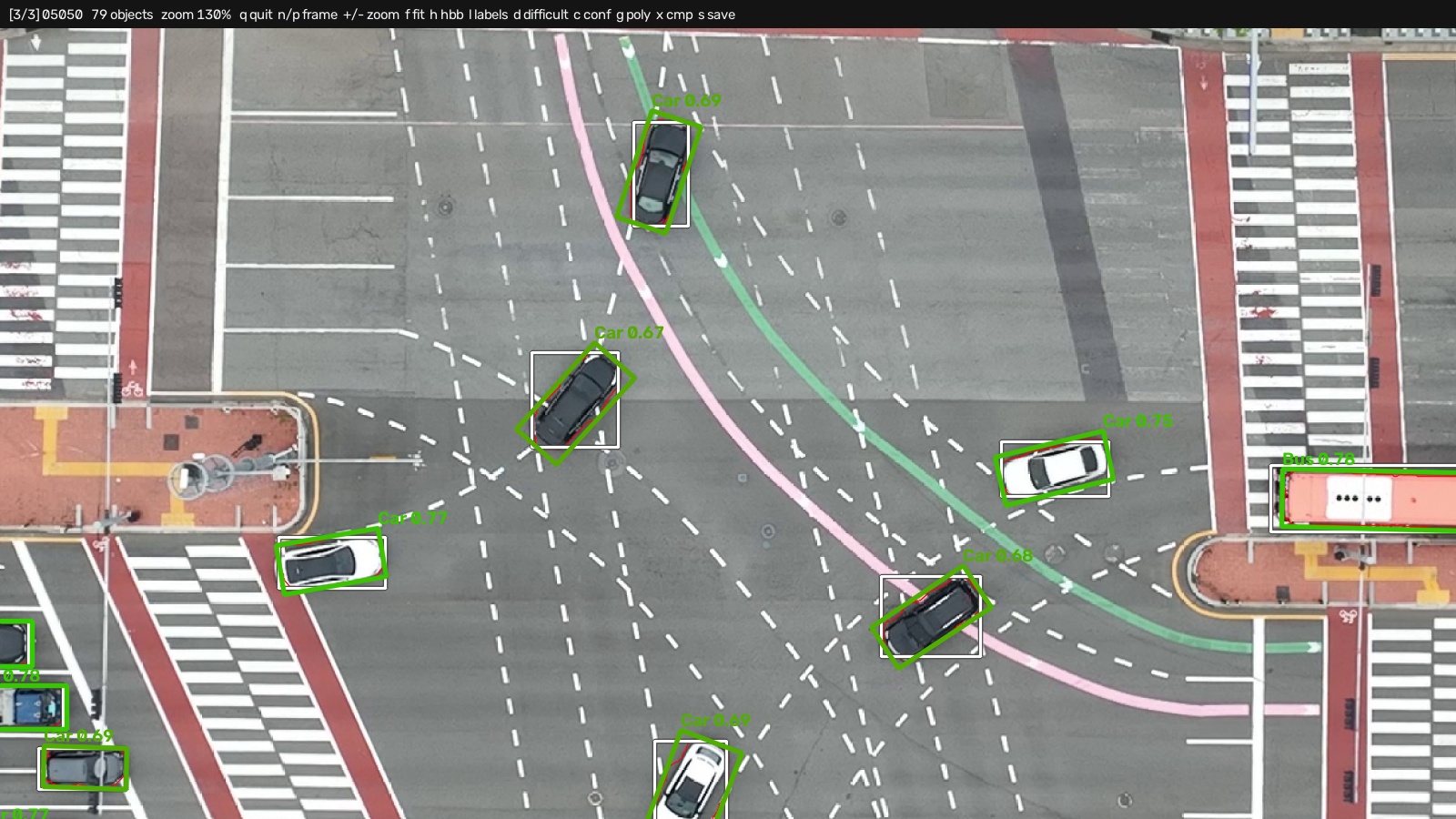
hbb2obb-view draws annotations over the images they belong to, in a window that pans and zooms, or into image files:
hbb2obb-view data/images                               # converted OBBs over their HBBs
hbb2obb-view data/images --show_confidence             # OBBs colored by confidence, score printed
hbb2obb-view data/images --compare data/labels_obb_gt  # ground truth overlaid in blue
hbb2obb-view data/images -o annotated                  # write annotated images, open no window
What it reads
img_source is one image or a directory of them. Each layer comes from a directory beside it unless a flag names one:
| Layer | Flag | Default, the first that exists |
|---|---|---|
| OBBs | --obb_dir / -od |
../labels_obb, ../labels_obb_gt, ../labels |
| HBBs | --hbb_dir / -hd |
../labels_hbb |
| segmentation polygons | --polygon_dir / -pd |
../labels_polygon |
| confidence side-car | --confidence_dir / -cd |
../labels_confidence |
| a second OBB set | --compare / -c |
none |
So hbb2obb-view images opens a converted set, a ground-truth set or a plain images/ + labels/ release without further flags. Class names come from -mp, or from a classes.yaml or names.txt beside the labels or one level up.
Colors
| Color | Layer |
|---|---|
| green | the OBBs; colored green to red by confidence with --show_confidence or the c key |
| white | the HBBs |
| red | the segmentation polygons (written by hbb2obb --save_polygon) |
| orange | boxes flagged difficult |
| blue | the --compare set |
The confidence comes from a 10th column on the OBB lines or from the side-car directory, which is read whether or not --show_confidence was given, so c works either way.
Formats
The viewer reads every format hbb2obb-convert writes. When a directory holds the same boxes in several formats, it reads the YOLO files by default, and also offers a COCO file paired with the directory (coco_annotations_<name>.json beside labels_<name>/). It prints what it found:
In the window, t and y step the OBB and HBB layers through those formats, re-reading every frame, and the status bar names the one on screen. --obb_format and --hbb_format pin one at startup. --obb_dir and --hbb_dir also accept a COCO .json file directly.
Keys
| Key | Action | Key | Action |
|---|---|---|---|
q, Esc |
quit | o |
show or hide the OBBs |
n, →, ↓ |
next frame | h |
show or hide the HBBs |
p, ←, ↑ |
previous frame | l |
show or hide the class labels |
wheel, +, - |
zoom about the cursor | d |
show or hide boxes flagged difficult |
| drag | pan | c |
color the OBBs by confidence, and print it |
f, 0 |
fit the frame to the window | g |
show or hide the segmentation polygons |
1 |
zoom to 100% | t / y |
read the OBBs / HBBs from the next format |
s |
save the current view to <frame>.view.jpg in the working directory |
x |
cycle the overlay: both sets, primary only, --compare only |
--frame / -f opens a given frame first, by file stem. --window sets the window size (default 1600x900). --hide_hbb and --hide_class_labels start with those layers off.
Writing images
--out_dir / -o draws every frame at full resolution to <out_dir>/<frame>.jpg instead of opening a window; --frame restricts it to one.
--crops writes a contact sheet of the individual objects rather than whole frames, as <frame>.crops<n>.jpg, to --out_dir or the working directory. --indices restricts the sheet to some boxes, by their row in the label file, to review particular objects:
All flags: hbb2obb-view reference.